Web357 Logo
Menu
  • Joomla! Extensions
    Browse all Joomla! Extensions
    PROPaid, no free version
    • Cookies Policy Notification BarPopular
    • Login as UserPopular
    • Monthly ArchivePopular
    • Microsoft/Outlook 365 Mail ConnectNew
    • Gmail SMTP ConnectNew
    • JMail LogNew
    • Multilingual 404 Page SelectorNew
    • Multiple Categories for K2
    • Contact Info
    Free + PROFree version, paid PRO upgrade
    • Fix 404 Error Links
    • Limit Active Logins
    • Failed Login AttemptsPopular
    • JLogsNew
    • VirtueMart Sales
    • Support Hours
    FreeFree download
    • Display Date and TimePopular
    • CountdownPopular
    • www Redirect
    • VirtueMart Count Products
    • Fixed HTML Toolbar
    • Web357 Framework
    All Access Joomla! Bundle: just €159

    The PRO version of all 15 paid Joomla! extensions, every new one we release, and premium support. All for €159 a year.

    The All Access Bundle

    arrow upSave €426 (73% off)

  • WordPress Plugins
    Browse all WordPress Plugins
    Free + PROFree version, paid PRO upgrade
    • Login as a UserPopular
    • Cookie Consent ManagerNew
    • Microsoft 365 & Outlook MailerNew
    • Gmail SMTP ConnectNew
    • Easy Custom Code (LESS/CSS/JS)
    • Email Activity MonitorNew
    • Fix 404 Error LinksNew
    • Limit Active LoginsNew
    FreeFree download
    • Count Characters, Words and Paragraphs
    • Fixed HTML Toolbar
    All Access WordPress Bundle: just €159

    The PRO version of all 8 paid WordPress plugins, every new one we release, and premium support. All for €159 a year.

    The All Access Bundle

    arrow upSave €153 (49% off)

  • Maintenance
  • Support
  • Blog
  • My Account
My Account
Web357 logo

Web357 delivers premium plugins and tailored solutions for Joomla! and WordPress websites. Since 2014, our experienced team has been committed to improving the performance, usability and security of these platforms. We focus on building tools that empower developers, digital agencies, and web professionals, backed by expert support and ongoing maintenance.

Company
  • About Us
  • Imprint
  • Media kit
  • Partners
  • Blog
  • Contact Us
  • Donate
Support
  • Help & Support
  • Pre-sales FAQ
  • Documentation
  • Maintenance
  • License
  • Contribute Translations
  • Latest Releases
Joomla!
  • Joomla! Extensions
  • Joomla! Bundle
WordPress
  • WordPress Plugins
  • WordPress Bundle

© 2026 Web357. All rights reserved.

  • Terms of Service
  • Privacy Policy
  • Refund Policy

Microsoft 365 & Outlook Mailer for WordPress

Microsoft 365 & Outlook Mailer for WordPress

Your WordPress site sends order confirmations, contact form replies and password resets, and your email runs on Microsoft 365 or Outlook. SMTP with a saved password stops working when the password changes or your admin turns SMTP sign-in off.

Microsoft/Outlook 365 Mail Connect signs in to Microsoft once with OAuth 2.0 and sends every WordPress email through the Microsoft Graph API. You register an app in Azure, paste two values into the plugin, sign in and send a test email.

The free version does the sending. PRO adds a mail log with resend, staging mode, a send limit, BCC, a default reply-to and sending from a shared mailbox.

Free version
  • 1 year of updates and support
  • 30-day money back guarantee
Microsoft 365 & Outlook Mailer for WordPress
Compatibility
WordPress5.xWordPress6.xWordPress7.x
WordPress.org
WordPress.org
Version
v1.0.3Changelog→
  • avatar
  • avatar
  • avatar
  • avatar
  • avatar
  • avatar
  • avatar
  • avatar
  • avatar
  • avatar
  • avatar
12,500+ customers since 2014

30-day money back guarantee · Support reply within 24 hours

🔐 Sign In with Microsoft, No SMTP Password

🔐 Sign In with Microsoft, No SMTP Password

🔐 Sign In with Microsoft, No SMTP Password

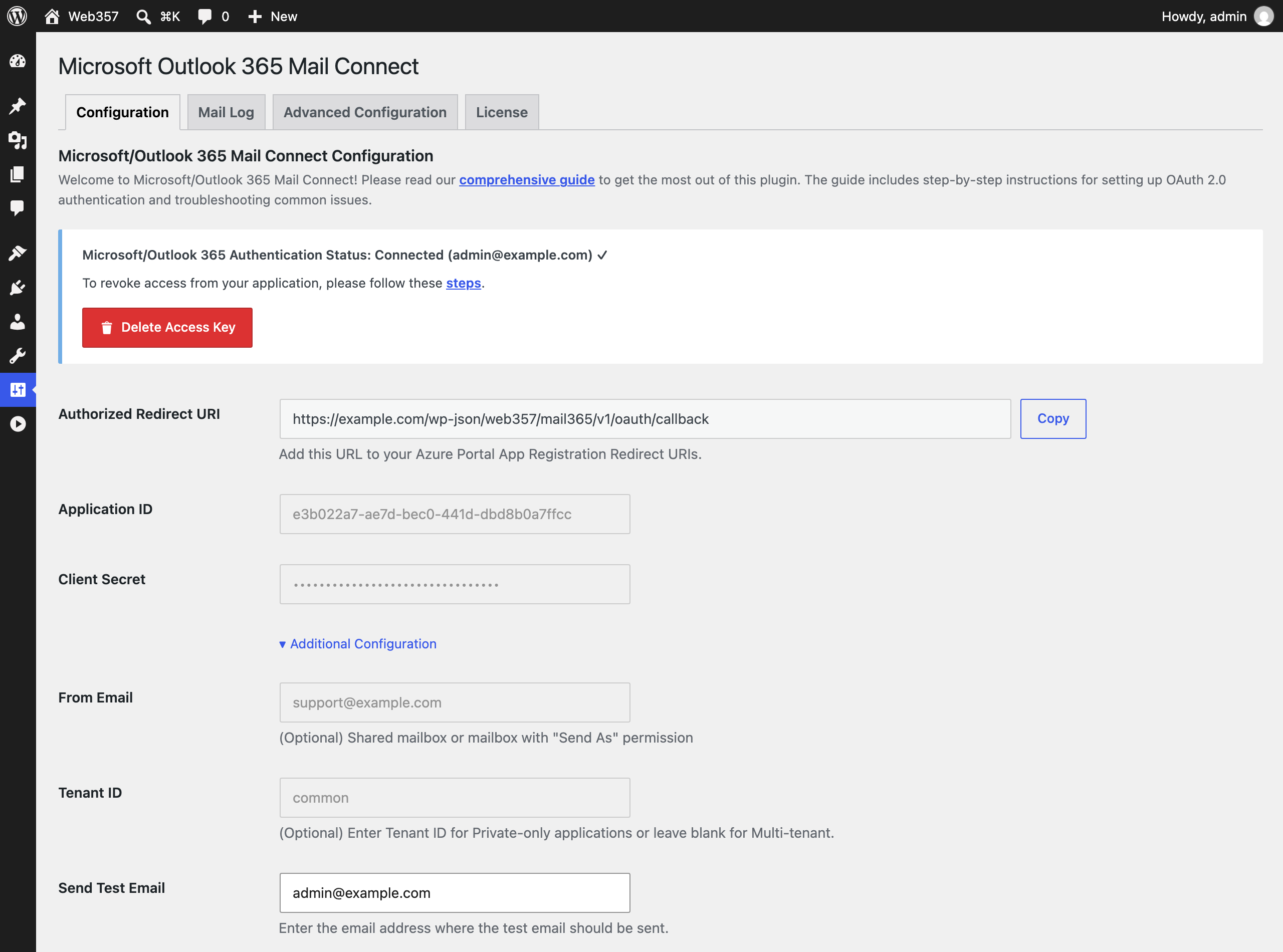
Register one app in Azure, paste two values into WordPress, and click Sign in.

The plugin shows the Authorized Redirect URI with a Copy button. The configuration guide takes you through the Azure app registration, then you paste the Application ID and Client Secret and send a test email.

  • Sends through the Microsoft Graph API, so it keeps working without SMTP AUTH
  • Enter a Tenant ID for a single-tenant app (free)
  • Sending from a shared mailbox with From Email is in PRO

📜 A Log of Every Email Microsoft 365 Sent

📜 A Log of Every Email Microsoft 365 Sent

📜 A Log of Every Email Microsoft 365 Sent

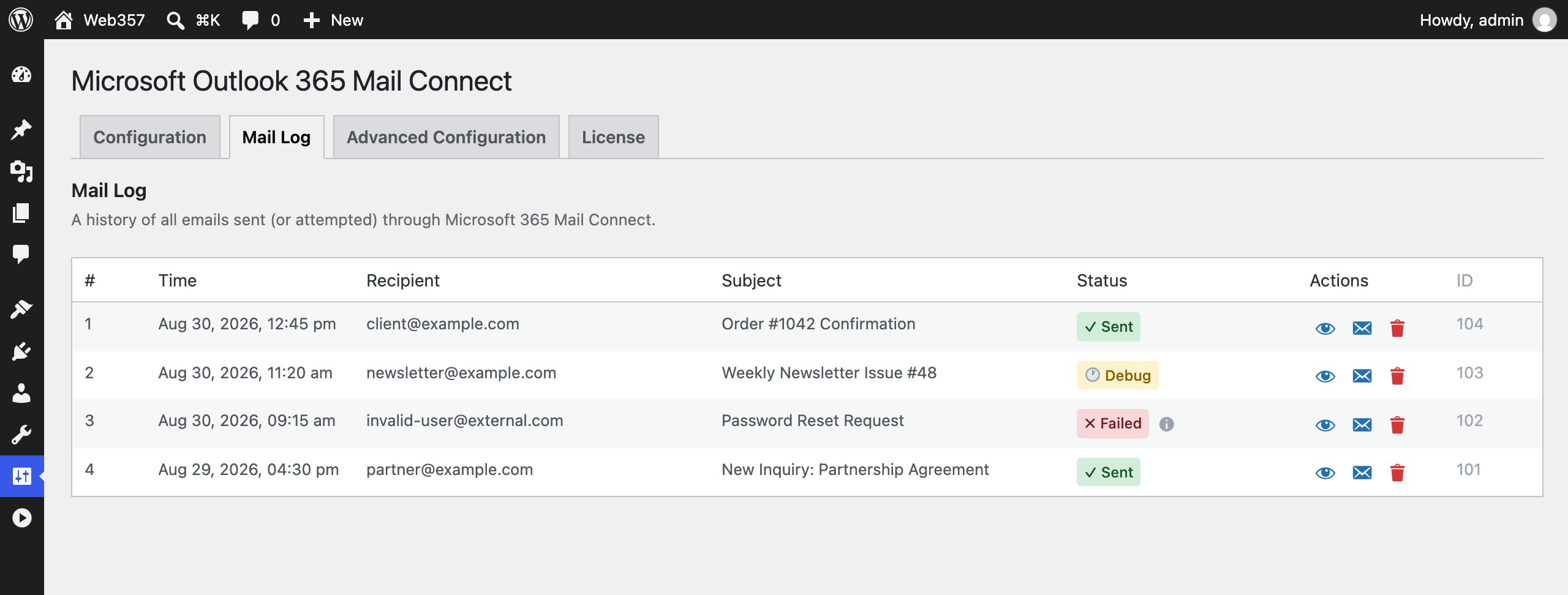
Find out whether an email was sent, staged or failed.

The Mail Log is in PRO. The Mail Log tab lists every message the plugin handled, with its recipient, subject and status.

  • Sent, Failed with the error, or staged mail
  • View, resend or delete a row
  • Turn logging off when you do not need it

🔍 The Full Message, Headers and Resend

🔍 The Full Message, Headers and Resend

🔍 The Full Message, Headers and Resend

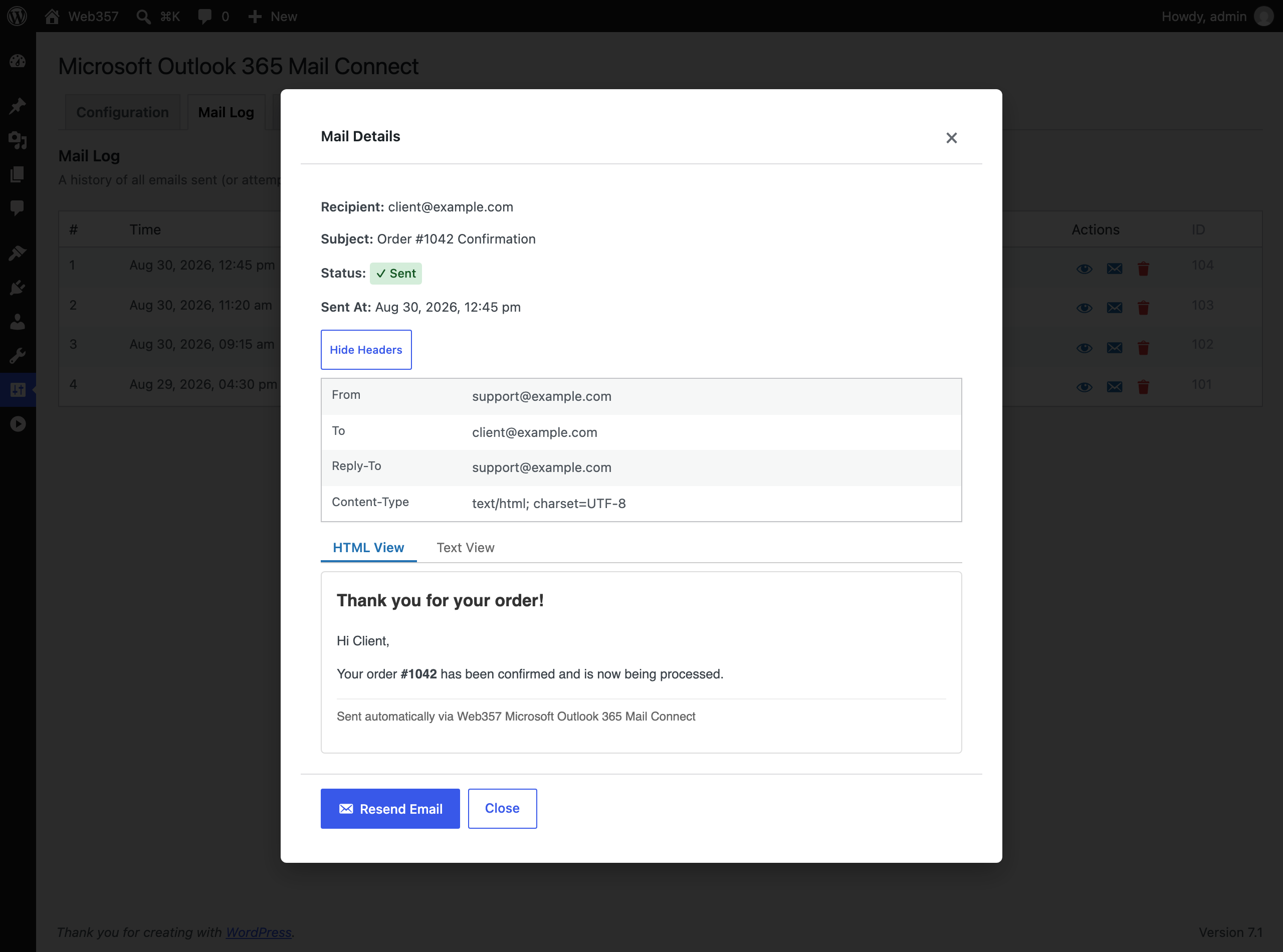
Read the email exactly as it went out, then send it again.

In PRO. Open any row to inspect the mail details: the headers, the HTML and text versions, and a Resend Email button.

  • From, To, Reply-To and content type
  • HTML view and text view
  • Resend a message a customer did not get

🧪 Staging, Throttle, BCC and Allowed From Addresses

🧪 Staging, Throttle, BCC and Allowed From Addresses

🧪 Staging, Throttle, BCC and Allowed From Addresses

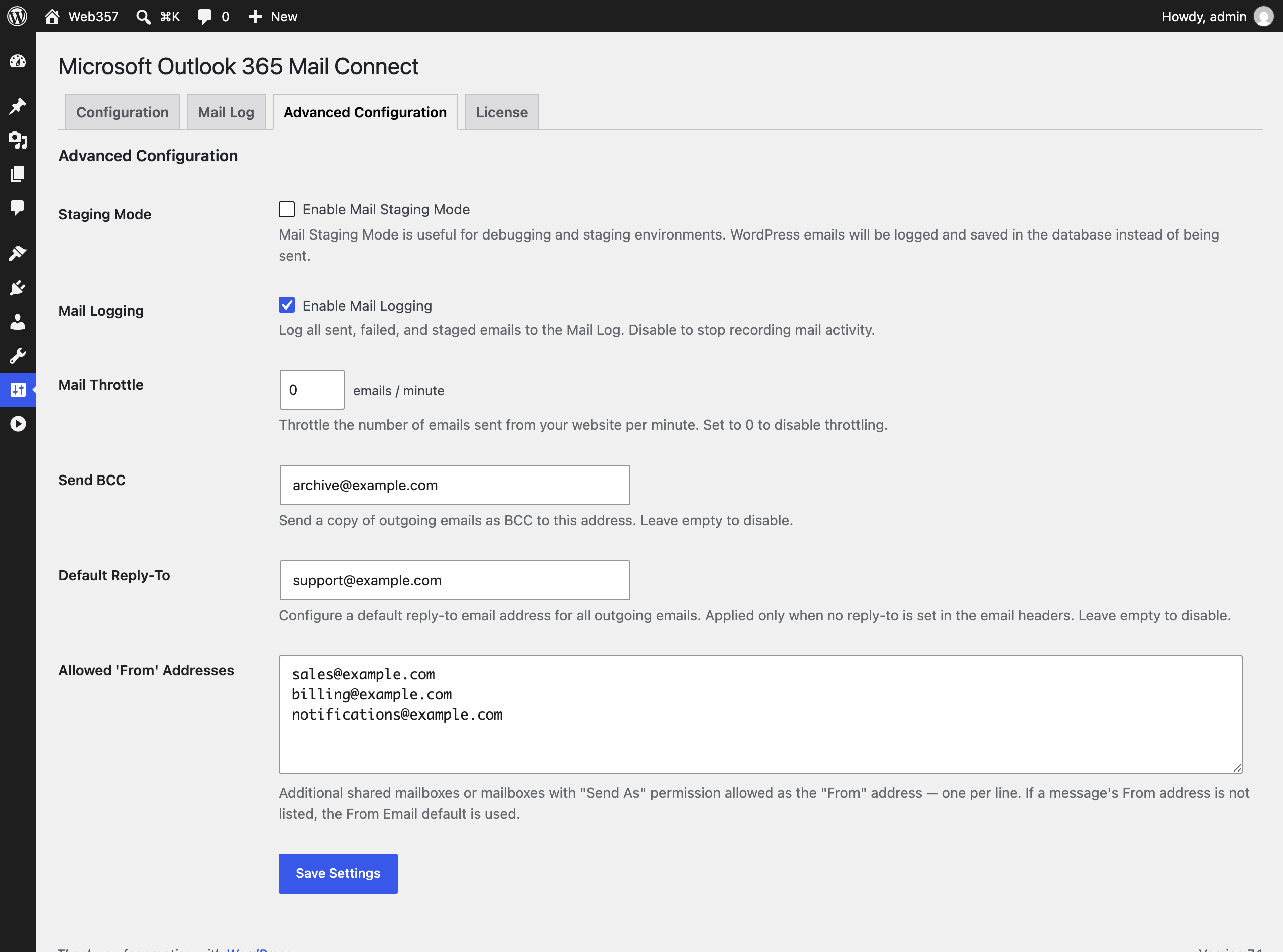
Control what leaves the site, and from which address.

The advanced settings are in PRO. Use them on a staging copy, on a busy shop, or when several departments send mail.

  • Staging Mode logs emails instead of sending them
  • Mail Throttle caps emails per minute
  • Send BCC, Default Reply-To, and a list of Allowed 'From' Addresses
Powerful Features
  • 📮 Every plugin sends through Microsoft 365

    The plugin routes every wp_mail() call, so WooCommerce, Contact Form 7, WPForms, Gravity Forms and the rest need no extra setup, as the FAQ explains.
  • 👥 Send from support@ or sales@

    In PRO, set a shared mailbox or one with Send As permission as the sender. The Send As guide shows the permissions to set in Microsoft 365.
  • 🛠️ Clear help when sign-in fails

    A 403 on the callback, a redirect URI mismatch or an inactive mailbox each have a fix in the troubleshooting FAQ and the 403 guide.
Order emails, contact forms and password resets have to reach the inbox. Microsoft/Outlook 365 Mail Connect sends them through your Microsoft 365 mailbox after a one-time sign-in, and the free version is on wordpress.org. The configuration guide walks you through the Azure setup.
Simple Pricing

Single Plugin (Pro)

€39/year

€19.50/year

Access to the Premium version of
Microsoft 365 & Outlook Mailer

Number of websites

Use it on any number of sites. Licenses for 1 website.

  • Premium support for 1 year

  • Plugin updates for 1 year

  • Life time usage

Ideal when you need just this one plugin.

Add €60 and get all 8 plugins on 1 website.

For agencies & multi-site owners
All Access Bundle

€159/year

€79.50/year

Costs less than 5 single plugins
About €9.94 per plugin

All 8 premium WordPress plugins, plus every new one we release.

Number of websites

Use all plugins on any number of sites. Licenses for 1 website.

Everything in Single Plugin, plus:

  • The other 7 premium WordPress plugins

    Login as a UserCookie Consent ManagerGmail SMTP ConnectEasy Custom Code (LESS/CSS/JS)Email Activity MonitorFix 404 Error Links
  • Every new plugin we release

  • One subscription, one renewal

  • Premium support for 1 year

  • Plugin updates for 1 year

  • Life time usage

money guarantee
30-day money back guarantee. No questions asked!

So much better than a trial because you can try it on your website and we will be there to fully support you during that time.

Free vs PRO

The PRO subscription includes 1 year of updates and priority support. You keep using the plugin after it expires.

FeaturesFREEPRO
Connect Microsoft 365 in one click
Link your Outlook or Microsoft 365 mailbox with a secure Microsoft login. No SMTP passwords and no app passwords required.
checkcheck
Send all WordPress emails through Outlook
Order confirmations, form submissions, password resets, and every other WordPress email go out from your real Microsoft mailbox through the Microsoft Graph API.
checkcheck
Built-in test email tool
Send a real test message from the WordPress admin to confirm everything works before you go live.
checkcheck
Works with WooCommerce and contact forms
Compatible with WooCommerce, Contact Form 7, WPForms, Fluent Forms, Gravity Forms, and any plugin that uses WordPress email. No extra setup per plugin.
checkcheck
Single-tenant mode
Enter your Tenant ID when your organisation allows only single-tenant apps. Learn more in Single tenant mode.
checkcheck
Disconnect anytime
Revoke access and delete the stored connection with one click whenever you want.
checkcheck
Full mail log
See every sent, failed, or staged email with headers, content preview, status, and timestamps, so you always know what was delivered.
closecheck
Staging mode for development sites
Save emails to a log instead of sending them. Perfect for staging and local sites where you do not want real customers to receive test messages.
closecheck
Limit emails per minute
Cap how many messages leave your site each minute to stay within Microsoft’s rate limits and avoid runaway email loops.
closecheck
Automatic BCC copy
Send a hidden copy of every outgoing email to an internal address. Useful for record-keeping and compliance.
closecheck
Default Reply-To address
Set a global reply-to address for all outgoing emails when a form or plugin does not specify one.
closecheck
Send from a shared mailbox
Send as support@, sales@, or any shared mailbox you have permission to use, plus an allow-list of extra From addresses.
closecheck
1 year of updates and support
Updates from the Plugins screen and help on the support page.
closecheck
Pre-Sale FAQs
  • What am I purchasing?
    You are purchasing a WordPress plugin subscription. Once the purchase is complete, you will gain access to our members' area, where you can download the latest versions and access our private support system.
  • What payment methods do you accept?
    We accept PayPal and all major credit cards via Stripe, including Visa, MasterCard, American Express, Discover, JCB, Diner's Club, and EnRoute.
  • Do you offer a refund policy?
    Yes! We provide a 30-day money-back guarantee on all subscriptions.
  • Can I use your plugins on more than one website?
    Yes. Each subscription covers 1, 3, 5 or unlimited WordPress websites, depending on the plan you choose on the pricing table.
  • Can I purchase just one plugin?
    Yes! You can buy a single WordPress plugin with updates & support for that specific product.
  • What's the difference between the "Single" and "Bundle" subscription?
    Single Plan – Perfect for personal use. Grants access to one premium WordPress plugin. Bundle Plan – Best value for your money, ideal for advanced users. Grants access to all Web357 premium plugins. Both plans include private support. Key Difference: With the Bundle Plan, you can download all premium Web357 plugins instead of just one.
  • Are there limits on how many times I can download my purchased plugins?
    No! You can download your WordPress plugins unlimited times during your subscription.
  • What happens when my membership expires?
    You can continue using your downloaded plugins, but updates & support will no longer be available.
  • How does your support work?
    We provide support via: - Private Support Ticket Area - Email Assistance - Live Chat (when available)
  • I have a question. How can I contact you?
    You can contact us at support@web357.com or via our pre-sales contact form.
  • What is the license for this product?
    This product is licensed under the GNU General Public License v3.0 (GPLv3).
Product FAQs
  • Which WordPress versions are supported?

    WordPress 5.3 or newer, tested up to 7.1, with PHP 7.4 or newer and HTTPS on your site. The installation guide lists the requirements.

  • What is free, and what is PRO?

    Free: OAuth 2.0 sign-in with Microsoft, sending every wp_mail() email through Microsoft Graph, single-tenant mode, the test email tool and Delete Access Key.

    PRO: the Mail Log with resend, Staging Mode, Mail Throttle, Send BCC, Default Reply-To, sending from a shared mailbox, Allowed 'From' Addresses, and 1 year of updates and support.

  • Does it work now that Microsoft has turned off basic SMTP authentication?

    Yes. The plugin signs in with OAuth 2.0 and sends through the Microsoft Graph API, not SMTP with a password, so the change does not affect it.

  • Our organisation only allows single-tenant apps. Will it work?

    Yes, in the free version. Register the app as single tenant in Azure and enter your Tenant ID in the plugin. Single tenant mode shows where to find it.

  • Can I keep a log of every email my site sends?

    PRO keeps a log of the emails this plugin sends, with resend. For a log of every wp_mail() call, whichever mailer sends it, use Email Activity Monitor.

  • Our email runs on Gmail, not Microsoft 365. What should I use?

    Use Gmail SMTP Connect. It does the same job for Gmail and Google Workspace accounts.

  • What happens after my PRO subscription expires?

    PRO keeps working on your sites. You can continue using the version you downloaded, but new releases and support stop until you renew, which you can do at any time from your Web357 account at the current plan prices.

Testimonials
12,500+
happy customers
  • Web357 creates super useful extensions. Login as User is fantastic for allowing site admins to understand the frontend UX from any user's perspective. No extra "test" users needed. Support is also amazing!

    Brian Mitchell
    President of InterGen Web Solutions
  • Web357 extensions are solid, reliable, and thoughtfully built - no fluff, just tools that do exactly what they promise. Support is incredibly responsive, and updates are clearly made with real users in mind. It's rare to find such professionalism in this space.

    Zlatko Enev
    Writer, Publisher - Librev.com
  • Tim Davis
    Joomla! Evangelist
  • We have used Joomla and WordPress plugins by Web357 for many years in various projects. The plugins are exceptionally reliable and robust. Special thanks to Yannis, for his outstanding assistance-always responsive and professional. Highly recommended for anyone seeking quality plugins and excellent customer support.

    Antonis Pavlidis
    Web Designer/Developer - Dazzlink
  • I've been using Web357's Joomla plugins for several years and I must say I've never had any problems; they've always met my expectations! My heartfelt congratulations to the Web357 staff.

    Mauro Miotello
    IT Consultant and Software Developer - Ashnet Consulting
  • Web357 extensions are reliable, well-crafted, and consistently updated. We've used them for years across professional Joomla and WordPress projects and have always been impressed by their performance and support. A trusted part of our development toolkit.

    Alexander Ioannidis
    Founder & Team Lead, PROUDPIXEL

Web357 creates super useful extensions. Login as User is fantastic for allowing site admins to understand the frontend UX from any user's perspective. No extra "test" users needed. Support is also amazing!

Brian Mitchell
President of InterGen Web Solutions

Web357 extensions are solid, reliable, and thoughtfully built - no fluff, just tools that do exactly what they promise. Support is incredibly responsive, and updates are clearly made with real users in mind. It's rare to find such professionalism in this space.

Zlatko Enev
Writer, Publisher - Librev.com
Tim Davis
Joomla! Evangelist

We have used Joomla and WordPress plugins by Web357 for many years in various projects. The plugins are exceptionally reliable and robust. Special thanks to Yannis, for his outstanding assistance-always responsive and professional. Highly recommended for anyone seeking quality plugins and excellent customer support.

Antonis Pavlidis
Web Designer/Developer - Dazzlink

I've been using Web357's Joomla plugins for several years and I must say I've never had any problems; they've always met my expectations! My heartfelt congratulations to the Web357 staff.

Mauro Miotello
IT Consultant and Software Developer - Ashnet Consulting

Web357 extensions are reliable, well-crafted, and consistently updated. We've used them for years across professional Joomla and WordPress projects and have always been impressed by their performance and support. A trusted part of our development toolkit.

Alexander Ioannidis
Founder & Team Lead, PROUDPIXEL
View all testimonials
Why Developers Trust Our Joomla! extensions & WordPress Plugins
  • Love & Attention
    Love & Attention

    Crafted with care, driven by passion, because when you love what you do, it’s impossible to hide.

  • Premium Support
    Premium Support

    We care about your website just as much as you do. Count on us for fast, helpful support.

  • Always Fresh Ideas
    Fresh Ideas, Always

    Great ideas come from fresh thinking, and we never run out of either.

  • Clean, Reliable Code
    Clean, Reliable Code

    Our code is clean, lightweight and built to industry standards, easy to use, easy to trust.

Latest Version

v1.0.3

View Changelog
WordPress Compatibility
WordPress5.xWordPress6.xWordPress7.x
License

GNU/GPL v3

WordPress.org
WordPressTry the free version

Install from the official WordPress.org directory

Get Microsoft 365 & Outlook Mailer

Send every WordPress email through your Microsoft 365 or Outlook mailbox with OAuth 2.0 and Microsoft Graph, so no SMTP password is stored on your site.

Buy PRO30-day money back guarantee

Microsoft 365 & Outlook Mailer

From €19.50/year · 30-day money back